
#1 Atlas by Collins (iPhone, iPad - $6.99)
If you have a soft spot for geography, then this interactive Atlas is for you. The robust apps put the world at your fingertips as it features satellite mapping images, physical maps, political maps, environmental maps and even population statistics. Atlas by Collins is also highlighted by street-level viewing for any location on the map!

#2 Clear
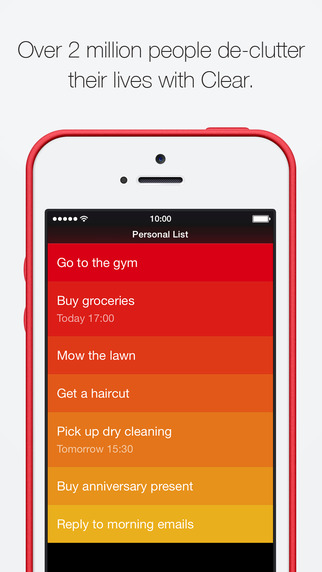
Currently $4.99 on the App Store.
Clear is proud to be a (PRODUCT)RED™ App Store partner and until December 7, you can give the gift of life by helping (RED) deliver the world’s first AIDS FREE GENERATION – 100% of the proceeds go to (RED)’s fight against AIDS. In addition to all the great features in Clear, you’ll receive an exclusive (PRODUCT)RED™ theme for use in Clear – available for a limited time only – and every purchase enables (RED) to provide 10 days’ worth of life-saving medicine for mothers with HIV.
Clear and (RED) are fighting for an AIDS FREE GENERATION, and we need your help.100% of the proceeds will go to (RED)’s fight against AIDS. All (RED) monies go to the Global Fund to fight AIDS, Tuberculosis and Malaria. Be sure to visit appstore.com/red and discover more Apps for (RED) partners.Over 2 million people de-clutter their lives with Clear, so stop stalling and start organising your daily routine.Clear is the revolutionary to-do and reminders app that makes you more productive. It’s as easy to use as pen and paper, and once you start organising your life with Clear you’ll wonder how you ever managed without it.- Simple gesture-based design that allows you to focus on your to-dos.
- Use separate lists to organize every aspect of your life.
- iCloud sync built-in so you can be productive everywhere.
- Set reminders so you’ll never forget important tasks.
- Personalize your Clear lists with themes and make them your own.
- One universal download for iPhone and iPad.
- Syncs with Clear for Mac (available separately on the Mac App Store)
#3 Highlight (iPhone, iPad, Android - Free)
First introduced at South By Southwest 2012, Highlight alerts you when a Facebook friend or an individual with similar interests is in your vicinity and allows users to send group messages to those nearby. It's no revolutionary social media app but in world where many bite the dust, it's your brand new wingman for adventures across the world.

#4 Flipboard (iPhone, iPad, Android - Free)
It's no secret: Flipboard is the worldwide leader in combining all the socially curated news you need. It's impeccable when it comes to daily use and in 2012 it introduced YouTube and Google+ integration along with a partnership with the New York Times to turn your mobile phone into a battery-charged newspaper.

#5 Pocket (iPhone, iPad, Android - Free)
How to disable iPhone cellular calls on iPad and Mac
Pocket is simple and intuitive, mainly because of its minimal design and control which allows users to change text size and share finished content through a variety of services.

#6 Google Maps (iPhone, iPad, Android - Free)
Though this app comes from Apple's primary nemesis, Google replaces Apple's underwater directions (yes, really) with the map app everyone wanted in the first place. It obviously presents a whole new spectrum of competition but there's denying it looks absolutely fantastic on a mobile screen.

#7 GarageBand (iPhone, iPad, - Free, $4.99)
GarageBand turns your iPad, iPhone, and iPod touch into a collection of Touch Instruments and a full-featured recording studio — so you can make music anywhere you go. Use Multi-Touch gestures to play a piano, organ, guitar, and drums. They sound and play like their counterparts, but let you do things you could never do on a real instrument. Enjoy Smart Instruments that make you sound like a pro — even if you’ve never played a note before. Plug an electric guitar into your iPad, iPhone, or iPod touch and play through classic amps and stompbox effects. Use a Touch Instrument, a built-in microphone, or a guitar and instantly record a performance with support for up of 32 tracks*. Record performances from third-party music and effect apps directly into GarageBand using Inter-App Audio in iOS 8. And share your song using email, Facebook, YouTube, SoundCloud, or AirDrop for iOS.
Play your iPad, iPhone, and iPod touch like a musical instrument
• Play musical instruments on the innovative Multi-Touch keyboard
• Tap out beats with acoustic and electronic drum kits
• Record your voice using the built-in microphone and apply fun sound effects
• Recreate legendary guitar rigs with 9 amps and 10 stompbox effects
• Use the Sampler to create new instruments from sounds you record, then play them on a keyboard
• Record compatible third-party music apps right into GarageBand using Inter-App Audio
• Play musical instruments on the innovative Multi-Touch keyboard
• Tap out beats with acoustic and electronic drum kits
• Record your voice using the built-in microphone and apply fun sound effects
• Recreate legendary guitar rigs with 9 amps and 10 stompbox effects
• Use the Sampler to create new instruments from sounds you record, then play them on a keyboard
• Record compatible third-party music apps right into GarageBand using Inter-App Audio
Sound like a virtuoso with Smart Instruments
• Conduct an entire string orchestra with just one finger using Smart Strings
• Tap chords to instantly create keyboard grooves with the Smart Keyboard
• Strum chords on an acoustic and electric Smart Guitar, trigger fingerpicking patterns for popular chords, or switch to Notes view to try your hand at the real thing
• Groove with a variety of Smart Basses using upright, electric, and synth sounds
• Drag drum instruments onto a grid to create your own beats with Smart Drums
• Conduct an entire string orchestra with just one finger using Smart Strings
• Tap chords to instantly create keyboard grooves with the Smart Keyboard
• Strum chords on an acoustic and electric Smart Guitar, trigger fingerpicking patterns for popular chords, or switch to Notes view to try your hand at the real thing
• Groove with a variety of Smart Basses using upright, electric, and synth sounds
• Drag drum instruments onto a grid to create your own beats with Smart Drums
Start a Jam Session with your friends
• Use your iPad, iPhone, or iPod touch to play or record live over Wi-Fi or Bluetooth with up to three of your friends
• Tempo, key, time signature, and chords automatically sync to the bandleader
• Jam with any Touch Instrument or live instruments like electric guitar or voice
• The bandleader automatically collects everyone’s recordings so they can be mixed as a song and shared
• Use your iPad, iPhone, or iPod touch to play or record live over Wi-Fi or Bluetooth with up to three of your friends
• Tempo, key, time signature, and chords automatically sync to the bandleader
• Jam with any Touch Instrument or live instruments like electric guitar or voice
• The bandleader automatically collects everyone’s recordings so they can be mixed as a song and shared
Create a song anywhere you go
• Arrange and mix your song with up to 32 tracks* using Touch Instruments, audio recordings, and loops
• Use the Note Editor to adjust or fine-tune any Touch Instrument recording
• Trim and place musical regions exactly where you want them to play
• Use the Mixer to fine-tune each track’s volume —solo or mute any track or adjust pan, reverb, and echo
• Choose from over 250 professionally prerecorded loops as a backing band to your song
• Arrange and mix your song with up to 32 tracks* using Touch Instruments, audio recordings, and loops
• Use the Note Editor to adjust or fine-tune any Touch Instrument recording
• Trim and place musical regions exactly where you want them to play
• Use the Mixer to fine-tune each track’s volume —solo or mute any track or adjust pan, reverb, and echo
• Choose from over 250 professionally prerecorded loops as a backing band to your song
Share your songs
• Keep your GarageBand songs up to date across all your iOS devices with iCloud Drive
• Create custom ringtones and alerts for your iPad, iPhone, or iPod touch
• Share your songs directly to Facebook, YouTube, and SoundCloud
• Email songs right from GarageBand
• Export your song and add it to the iTunes library on your Mac or PC
• Share GarageBand projects directly between iOS devices using AirDrop for iOS
• Keep your GarageBand songs up to date across all your iOS devices with iCloud Drive
• Create custom ringtones and alerts for your iPad, iPhone, or iPod touch
• Share your songs directly to Facebook, YouTube, and SoundCloud
• Email songs right from GarageBand
• Export your song and add it to the iTunes library on your Mac or PC
• Share GarageBand projects directly between iOS devices using AirDrop for iOS
* 32 tracks available on iOS devices with the A7 chip or higher. 16 tracks available on iPhone 5c, iPhone 5, iPhone 4s, iPad (4th generation), iPad (3rd generation), iPad 2, iPad mini, and iPod touch (5th generation).
For more UPDATES , REVIEW , NEWS just FOLLOW my BLOG AND Website !
Technorig.in


No comments:
Post a Comment