
Introduction:
- Preceding sections talked about how to avoid memory fragmentation by breaking process memory requirements down into smaller bites ( pages ), and storing the pages non-contiguously in memory. However the entire process still had to be stored in memory somewhere.
- In practice, most real processes do not need all their pages, or at least not all at once, for several reasons:
- Error handling code is not needed unless that specific error occurs, some of which are quite rare.
- Arrays are often over-sized for worst-case scenarios, and only a small fraction of the arrays are actually used in practice.
- Certain features of certain programs are rarely used, such as the routine to balance the federal budget. :-)
- The ability to load only the portions of processes that were actually needed ( and only when they were needed ) has several benefits:
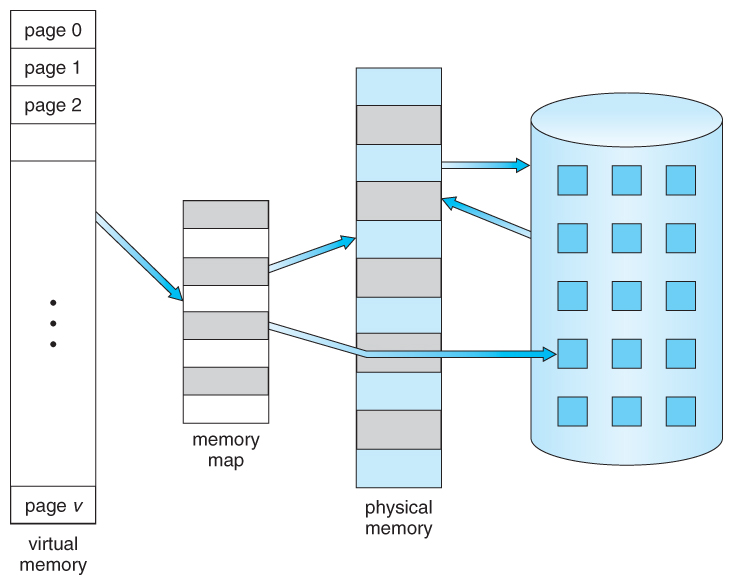
- Programs could be written for a much larger address space ( virtual memory space ) than physically exists on the computer.
- Because each process is only using a fraction of their total address space, there is more memory left for other programs, improving CPU utilization and system throughput.
- Less I/O is needed for swapping processes in and out of RAM, speeding things up.
Diagram showing virtual memory that is larger than physical memory
- Virtual memory also allows the sharing of files and memory by multiple processes, with several benefits:
- System libraries can be shared by mapping them into the virtual address space of more than one process.
- Processes can also share virtual memory by mapping the same block of memory to more than one process.
- Process pages can be shared during a fork( ) system call, eliminating the need to copy all of the pages of the original ( parent ) process.

Shared library using virtual memory


No comments:
Post a Comment